Web Development
Next.js 14 Intercepting Routes
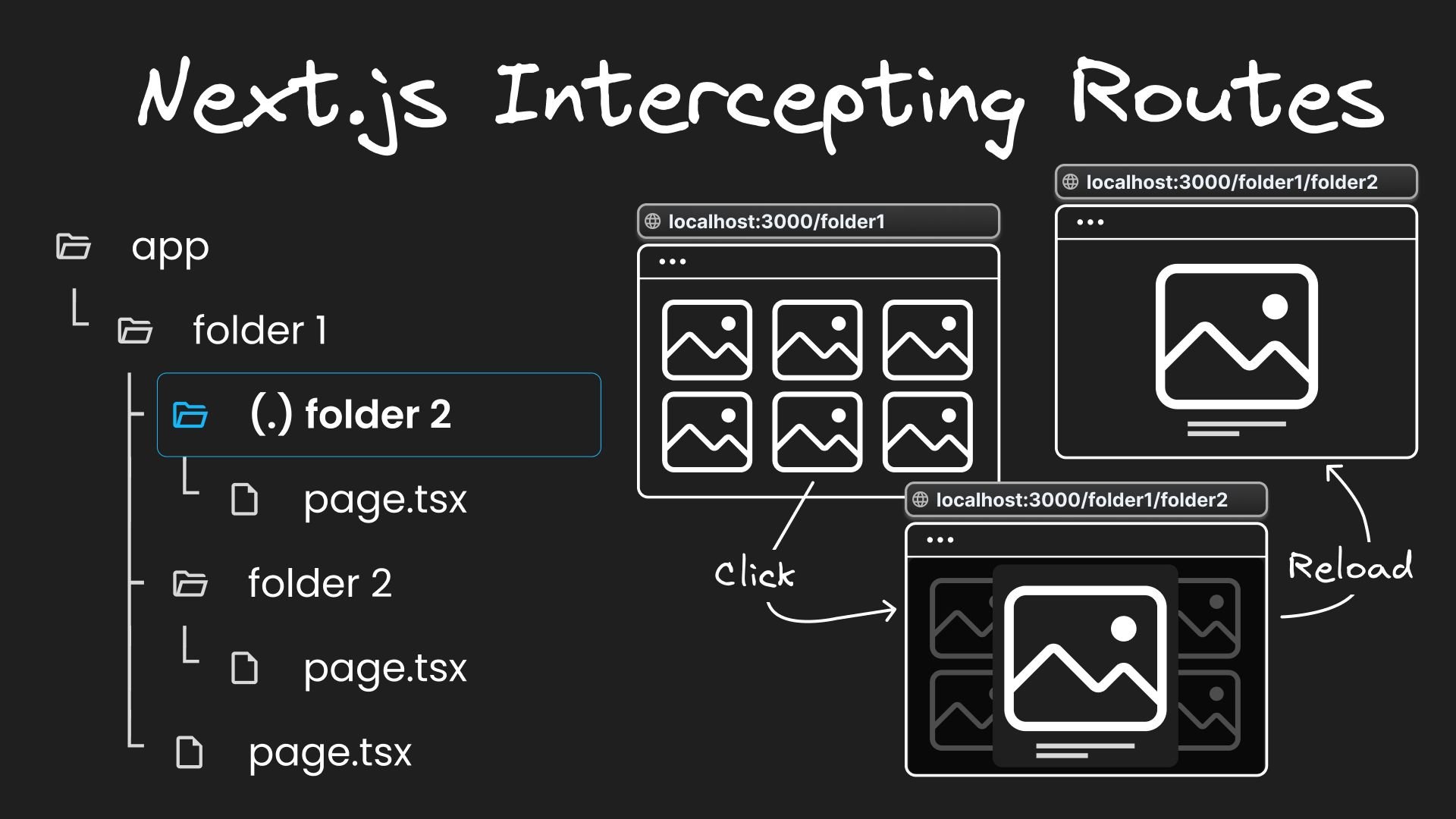


Next.js's app router introduces two advanced routing patterns: parallel routes and intercepting routes. After exploring parallel routes in our previous post, we'll now delve into intercepting routes in Next.js.
What are Intercepting Routes?
Intercepting routes allow you to intercept or stop the default routing behaviour to present an alternate view or component when navigating through the UI, while still preserving the intended route for scenarios like page reloads. This can be useful if you want to show a route while keeping the context of the current page.
Practical Examples
1. Login modal: Consider a navigation bar with a /login link. Traditionally, this leads users to a full login page. With intercepting routes, you can display a login modal while the URL reflects /login, making the link shareable and ensuring the full login page is displayed on page reloads or direct accesses.

2. Photo feed: In a photo feed application, clicking a photo typically navigates to a new page dedicated to that image. With intercepting routes, clicking a photo opens a modal within the feed, displaying an enlarged photo. The URL updates to reflect the selected photo, remaining shareable. Direct URL access or page reloads lead to the full-page view of the photo.

Defining Intercepting Routes in Next.js
Let’s see how this is implemented in code.
Setting Up Basic Navigation
Create a simple two-page navigation setup:
app/folder1/page.tsx: Represents the routelocalhost:3000/folder1.app/folder1/folder2/page.tsx: Represents the routelocalhost:3000/folder1/folder2.
Add a link in folder1's page.tsx to navigate to folder2. In the browser, navigating to localhost:3000/folder1 shows the folder1 page with a link to folder2.
Clicking the folder2 link typically takes you to localhost:3000/folder1/folder2. However, with intercepting routes we can change that behavior.
Intercepting routes conventions
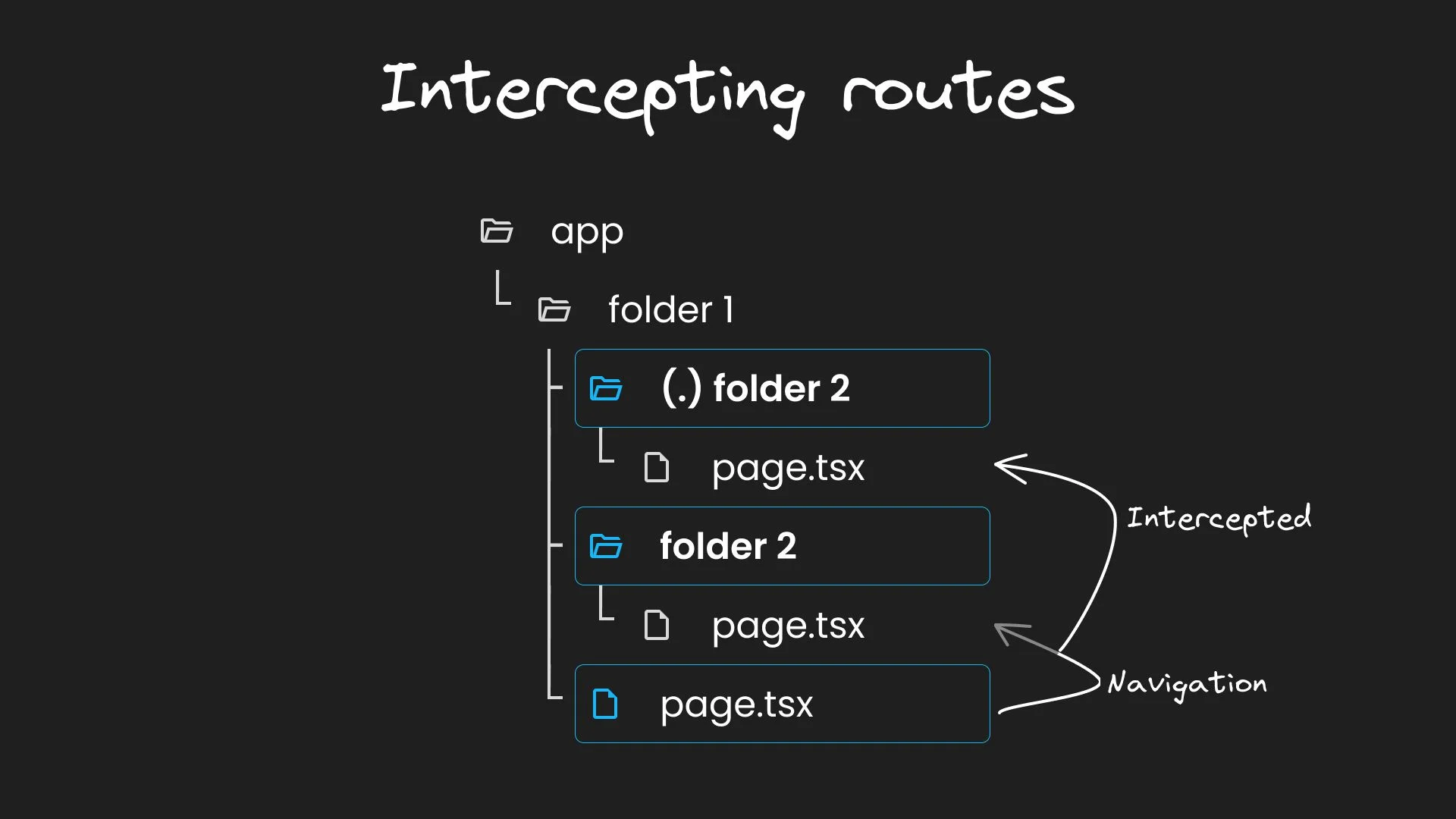
Next.js uses a (.) convention to match segments on the same level. To intercept navigation from /folder1 to /folder1/folder2, create a (.)folder2 directory within folder1, i.e at the same level as folder2. Here, define a new component in page.tsx:
With this setup, clicking the link updates the URL to /folder1/folder2 but shows the intercepted route content. However, a page reload displays the original folder2 content.
Advanced intercepting patterns
Next.js also allows intercepting routes at different levels using the following conventions:
(..)to match segments one level above.(..)(..)to match segments two levels above.(...)to match segments from the root app directory
Note that the (..) convention is based on route segments, not the file-system.
💡 Explore examples of the directory structure in this repository or through a video tutorial on my YouTube channel.
Conclusion
Intercepting routes in Next.js is a powerful feature that enhances the flexibility and user experience of web applications. It allows displaying content from different parts of the app without changing the context for the user. This concept can be slightly complex, but with practice, it becomes a valuable tool in your development kit.
Share